Our internal tools, built with AI coding tools, reached first real use in days or weeks. Replacing the spreadsheets behind them took longer by design: a parallel run with an exit rule of three weeks with no differences, and reconciliation that showed the old tools were often the ones that were wrong. Inside the tools, AI reads unstructured input while hours and money stay in deterministic code.
AI coding tools have made the first version of an internal tool quick to get. A working screen, a database and a sign-in page can exist within days, and the demo usually looks finished. What it cannot show yet is whether the numbers on the screen are right, who should be allowed to see them and what happens on the morning the old spreadsheet is switched off.
Since December 2025 we have replaced the spreadsheets behind our resource allocation, invoicing and performance reviews with a suite of internal tools built with AI coding tools. Our COO built most of the delivery and finance side himself, without a developer background. Assigna, the allocation and invoicing tool, reached real use six and a half weeks after its first line of code.
Retiring everything it replaced took longer, and that was a deliberate choice. We ran Assigna in parallel with the old spreadsheets and agreed to switch only after three weeks with no differences between them. By the time the spreadsheets were retired, its capacity figures matched our previous planner to within 0.02% over 18 months, and the parallel run had shown that the old tools were often the ones that were wrong.
That stretch is where an AI-built tool becomes a production tool, and it is the subject of this article. If you are a founder deciding whether an AI-built version is ready for real users, or an operator or innovation lead about to retire a spreadsheet the business runs on, you face the question we had to answer: when can you rely on it? What follows covers what that took, where AI belongs inside the tools and the order we would follow if we started again.
What our internal tools replaced, and why we built instead of bought
Before the suite, the picture of our delivery business lived in several places at once. Allocations sat in Float and in spreadsheets and invoice forecasts in a projection sheet, while project financials and delivery KPIs filled more spreadsheets. Project managers kept the same facts in sync across all of them, and on three separate days in spring 2026, four systems gave four different day counts for the same person.
Performance reviews ran the same way. Every employee and manager filled in one Confluence page per person per month (54 pages for May 2026 alone), and the scores were then averaged by hand in Excel. 360 feedback had run once, as a Google Form.
These are the processes that reward automation: repetitive, high in volume and easy to check against a known right answer.
We did not run a search for a better planner. Float records days, while our process needed contracts, rates, invoices, corrections and KPIs on the same data. The aim was to replace a stack of tools that each held part of the truth with systems that hold all of it. As a company that builds AI products for clients, we also wanted to test on our own operations how far AI coding tools can take someone who is not a developer.
The suite today:
| Tool | What it does | Status |
|---|---|---|
| Assigna | Allocation, contracts, invoicing, delivery KPIs and weekly project reports | Live; sole tool for allocation and invoicing since October 2026 |
| Merita | Monthly performance reviews and 360 feedback | Live company-wide since July 2026 |
| Aula | Shared sign-in, access and people directory for every app | Live since January 2026 |
| Moneta | Salaries, with cashflow and planning next | Live for salaries |
| Metra | AI-assisted estimation from scope documents | In use alongside our CTO's estimates |
| Tableta | Internal dashboards fed by scheduled data pulls | Live |
When the pain is several tools disagreeing, another tool rarely fixes it. Building pays off when the value sits in joining data that currently lives apart.
How fast internal tools built with AI reach first use
The first tool, Metra, produced its first estimate two days after its first commit in December 2025, and Aula, the shared sign-in, worked on the day it was created. The bigger tools took weeks rather than months. Assigna went from a first prototype to project managers using it on real projects in 6.4 weeks, while Merita, built by two developers and a delivery lead with two project managers testing the process, ran its first company-wide review cycle 14 weeks after its first line of code.
The code was written with Claude Code and Cursor. Much of the speed, though, came from constraints set before the first feature. On day two the code structure was fixed: the same six layers in every app, validation at every boundary and no shortcuts to the database. Every commit passes a type check, a full build and the unit tests before it lands. With one structure everywhere, AI-generated code stays consistent and easy to review, a lesson our engineers also drew from starting AI development from structured documentation.
New apps started as copies of a working one, and shared pieces such as sign-in and background jobs moved into common packages as soon as a second app needed them. As the suite grew, we consolidated it around a single identity: Aula issues one ID per person, each app keeps its own database and apps exchange data only through their APIs. The architecture rule fits in one line: one shared key for every person, a separate database for every app.
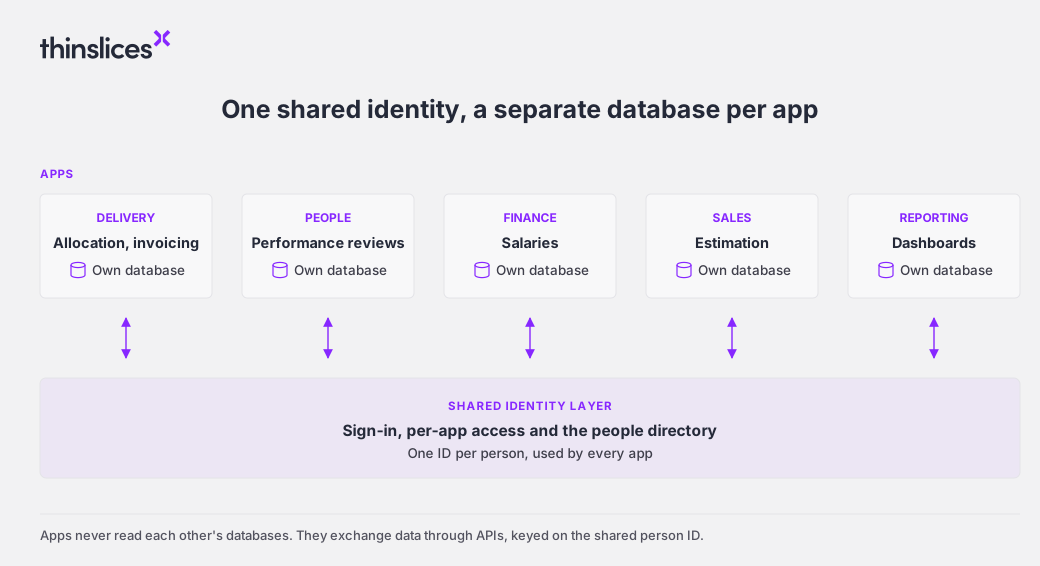
A new app gets sign-in and the people list on day one, because identity lives in one place.
GitHub's 2025 Octoverse report found that 80% of new developers on the platform use Copilot in their first week, so AI-assisted first versions are quickly becoming the default. What kept ours fast as the suite grew was deciding the structure before the features.
How we moved internal tools built with AI into production
Assigna reached project managers on 5 March 2026 with a plain instruction: run it in parallel with the spreadsheets for a while. Two weeks later the trial was narrowed, with project managers entering only contracts and allocations while invoices stayed read-only, so the two systems could be compared on a small surface first.
The full switch was set for 1 August. When the date came, Assigna and the old tools still disagreed in too many places, so we held the switch and replaced the date with a rule: move only after three weeks with no differences. A date measures how long a team has waited. A rule measures whether the new system can be relied on, which is the point of defining what good enough means before you build.
The parallel run also surfaced something the spreadsheets had hidden: the old tools were often the ones that were wrong. Reconciling June 2026 against Float found a gap of about 78 person-days, 52 of them availability for people no longer in delivery and 26 from schedules that had drifted. After the fixes, June differed by half a day, and across 18 months of history the capacity figures agree to within 0.02%. As one project manager put it, "As suspected, Float was out of sync."
We moved data type by data type rather than project by project. Weekly reports left Atlassian in July and KPIs followed. On 2 October allocation and invoicing moved over in full and the spreadsheets were retired. A per-project switch was ruled out because the numbers leadership relies on (capacity, billability, revenue) only make sense across the whole dataset. By then project managers were the ones asking when the switch would come.
Most of the engineering in this stretch went into correctness rather than new features. In Assigna, changes that corrected behaviour outnumbered changes that added features 1.42 to one, much of it on cases a spreadsheet keeps out of view: public holidays per country, worked holidays credited back to capacity, part-time schedules, weeks that span two months, three pricing models, billing in advance or in arrears and three currencies. A nightly job carries any difference between planned and delivered work onto the next invoice. All 129 bugs logged against Assigna are closed, and typical fixes went from report to deployed in 19 to 37 minutes.
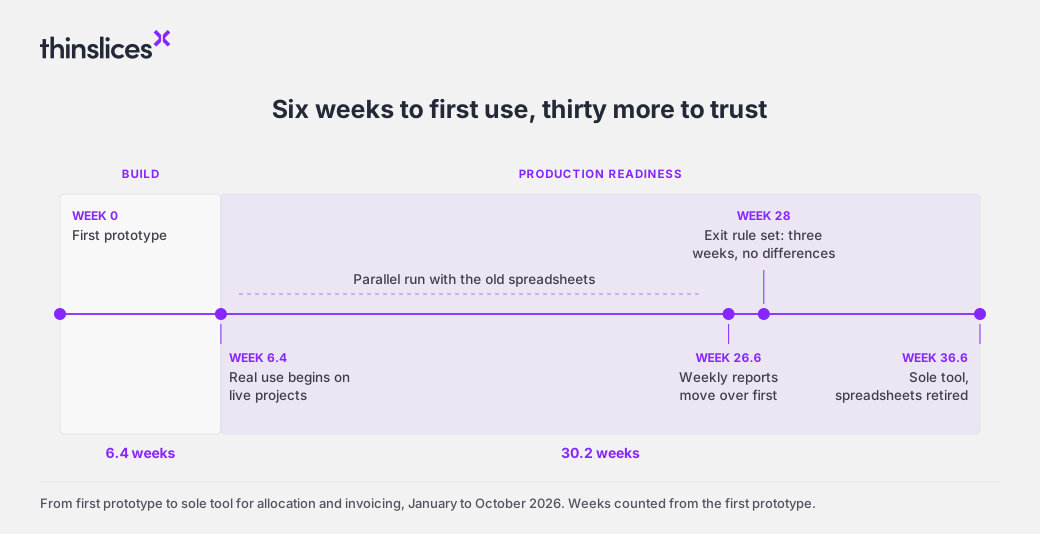
The build took six weeks. Earning the right to switch off the spreadsheets took the other thirty.
The gap between producing code and trusting it is common. In Sonar's 2026 survey of more than 1,100 developers, 96% said they do not fully trust that AI-generated code is functionally correct, yet only 48% always check it before committing.
For any AI-built system that will replace a source of truth, the parallel run is where trust is earned. Agree the rule for switching before anyone sets a date, and expect the comparison to clean up the old data as much as it tests the new.
Where AI belongs inside internal tools
Every tool in the suite was built with AI, but AI runs inside only some of them, and that was a design decision. Where the output is money or hours, the logic is ordinary code that gives the same answer every time. Assigna's forecasts, KPI scores and red, amber and green statuses all come from deterministic rules, so every figure can be traced back to the data behind it.
AI earns its place where the input is unstructured. Metra takes scope in whatever form it arrives (PDFs, images, recordings, Confluence pages, spreadsheets), turns it into epics and user stories, proposes sizing and finds similar past work. The hours are then calculated by code calibrated on human estimates. Its documentation states the split plainly: AI extracts structured information and deterministic code does the numeric learning.
The third use is conversational. Assigna and Tableta can be queried from Claude, which sees exactly what that user is allowed to see in the app and nothing more. A project manager can ask about allocations or invoices in plain language without anyone securing a second permission model.
The pattern carries over to any product: let AI read the messy input, and keep the numbers people are paid or invoiced on in code you can audit. Deciding what not to build applies to AI features as much as to scope.
Where to start when you build internal tools with AI
Based on how our suite came together, this is the order we would follow again:
- Identity and people first. Every app needs the same three answers: who can sign in, what each person may do there and who works here in which role. With one hub in place, a new app gets sign-in and the people list on day one.
- Then the process with the most double entry and money at stake. For us that was allocation and invoicing, because almost everything else reads from it. Assigna now runs every weekly project report, and 96.7% of them have been published.
- A people process with a monthly rhythm next. It reaches everyone and carries little financial risk. Merita turned 360 feedback from a one-off form into a monthly cycle with 87 to 92% completion.
- Finance consolidation and dashboards last, once the data they depend on can be trusted.
Throughout, report totals from the app rather than from side queries. Our suite runs its 936 test files on every commit.
Building is clearly on the rise. In a 2026 survey by Retool, which sells an internal-tool platform, 35% of 817 customers and builders said they had already replaced at least one SaaS tool with a custom build. Buying is still the better call for some of it. We kept off-the-shelf tools for issuing invoices, leave requests and engagement surveys, because each does one job well and carries its own compliance.
Quick to build, slower to trust
AI coding tools changed who can build the first version of an internal tool and how soon it appears. Our COO built the tool the company now runs delivery and invoicing on. What production asks of that tool stayed the same: numbers that agree with reality, access that matches each person's role and a switch-over decided by evidence rather than by the calendar. Teams that treat those questions as part of the build from the first week end up with software they can rely on. Teams that leave them for launch day tend to end up with one more system to reconcile.