A clickable prototype no longer proves much by looking finished, since AI tools can now produce a convincing one in an afternoon. Before it is used to approve a build budget, it should pass four tests: it holds up beyond the happy path, the people who will use it have reacted to it, every screen maps to the feature breakdown and the assumptions behind it are written down. What it cannot show is demand, behaviour under real conditions or build effort.
For most of the last decade, a clickable prototype was a reasonable signal that a product had been thought through. Producing one took a designer weeks of work on flows, screens and interactions, and the effort itself forced decisions about what the product did and in what order. A founder who could walk an investor through twenty linked screens had usually answered a fair number of hard questions along the way.
That link has weakened. Design tools with AI built in, and coding tools that turn a prompt or a design file into a working front end, can now produce a convincing prototype in an afternoon. In the State of Prototyping survey UX Tools ran in spring 2026, 43.8% of designers said they now spend more than half their building time on AI-generated code. The result looks finished, responds to every click and holds up well in a demo. What it no longer tells anyone is how much thinking sits behind it.
The gap matters most at one moment: when a prototype is presented as the basis for approving a build budget. The useful question for a budget holder at that point is whether the prototype has settled the decisions that are expensive to change later, and whether the parts it leaves open are written down. Whether it looks right comes a distant second. In our own product design phases, a prototype is never signed off on its own; it is reviewed against the feature breakdown and release plan it is supposed to reflect.
What a product design phase delivers as a whole, including the difference between clickable and functional prototypes, is covered in why a product design phase comes before the build budget. This article looks at the prototype on its own terms: what it should prove before a build is funded, what it cannot prove and how to review one before signing off.
Why a polished clickable prototype proves less than it used to
Fidelity used to be a rough proxy for effort, and effort a rough proxy for thinking. Neither holds now, and polish can work against the purpose of the exercise. Stakeholders shown a prototype that looks finished tend to react to what is on the screen: the layout, the colours, the copy. The questions a build budget depends on, such as what happens when an approval is rejected or which screens belong in the first release, rarely come up unprompted when everything already looks resolved.
The tools producing that polish have limits of their own. When Nielsen Norman Group tested AI prototyping tools against a real design project in October 2025, it found they follow general directions but lack the judgment of an experienced designer, and that the output often feels "good from afar, but far from good."
The playbook our product design teams work from is blunt about this. Its rule of thumb is to match fidelity to the decisions the team needs to make. Among the warning signs it lists for the validation stage are a prototype too rough to generate meaningful feedback or too polished to change, and feedback sessions that turn ceremonial, where the client says it looks good without engaging with any of it.
The useful question about a prototype is therefore what it has been used to decide. A rough one that settled the priority of three journeys and exposed two broken assumptions has done more work than a beautiful one admired in a single review.
Four things a clickable prototype should prove before you fund the build
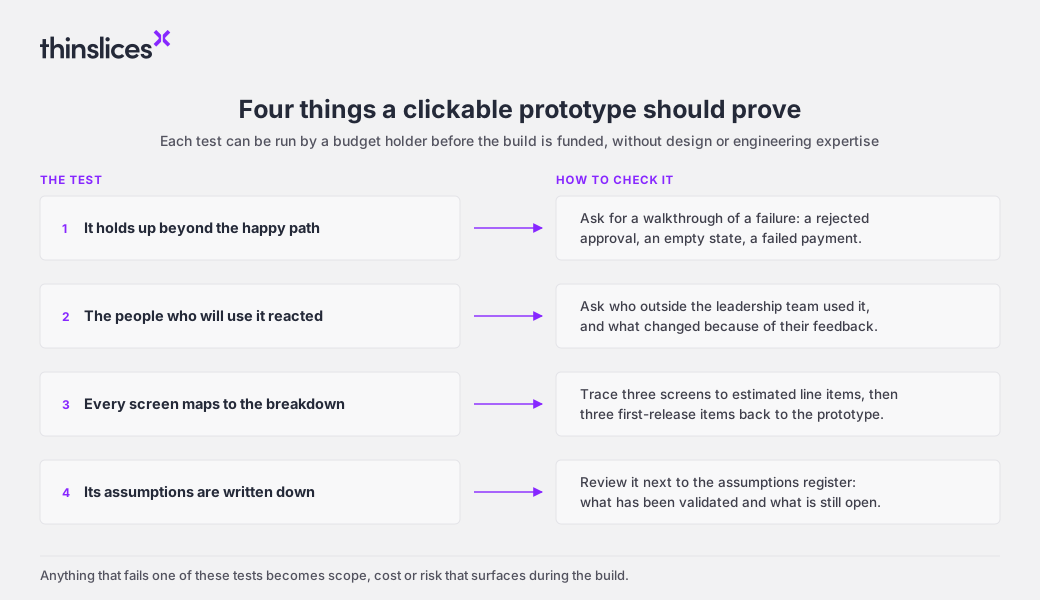
Each of these can be checked by a budget holder without design or engineering expertise, and each corresponds to a kind of scope that otherwise surfaces during the build.
1. The prototype holds up beyond the happy path
The happy path is the route through a product where everything goes right: the user has the data, the payment clears, the approver says yes. Demos follow it because it is the shortest way to show what a product does, which also makes it the part with the least scope behind it.
Much of the work in a business product sits in the states around that route: the empty dashboard before any data exists, the rejected approval, the failed payment, the user with partial permissions. Our product design work describes each core use case through its main flow, its alternative paths and its exceptions for this reason. A prototype does not need every one of those states at full fidelity, but the primary journeys should be fully walkable and the most consequential alternative paths should exist as screens rather than as a verbal reassurance that they would be handled.
The quick test is to ask for a walkthrough of a failure. If the prototype stops there, the estimate probably does too.
2. The people who will use the prototype have reacted to it
A prototype has two audiences who judge it by different standards. The people funding the product judge it against what they want to buy. The people who will use it every day judge it against how the work actually happens, and they are the ones who notice that the approval process has a fourth step or that nobody has the information the second screen asks for.
The playbook expects the prototype to reach stakeholders and, ideally, users, and it pushes teams to speak with end users directly rather than only with the client's internal stakeholders. "Ideally" is doing honest work in that sentence, since end users are not always reachable inside a four to six week phase. When they are not, the gap belongs in writing as an open assumption, where a stakeholder speaking on their behalf cannot quietly close it.
Framing matters as much as attendance. Asking people what they think of a prototype produces impressions, while asking them to confirm that a specific flow matches their approval process produces a decision. A sign-off record full of "looks good" suggests the sessions were the first kind.
3. Every screen in the prototype maps to the feature breakdown
A feature breakdown is the itemised list of what the product does, written at a level of detail that can be estimated and prioritised. The playbook names the breakdown and the designs evolving independently, until they tell different stories about the product, as one of the clearest signs a phase is going wrong.
Drift is easy to miss because each looks complete on its own. A screen added during a late feedback session may never reach the breakdown, so it was never estimated. A line item agreed in a scoping conversation may never reach the prototype, so nobody has seen it.
The check takes a few minutes. Pick three screens and find each one in the feature breakdown, with its estimate and its release. Then pick three items from the first release and find them in the prototype. Anything that appears on one side only is either unpriced or untested, and both are cheaper to fix before the budget is approved.
4. The assumptions behind the prototype are written down
Some of what a prototype shows is real and some is simulated. A screen full of customer records looks the same whether the integration that would supply them has been tested or merely assumed, and nothing on the screen says which.
That information lives in an assumptions register, a running list the product manager keeps from the first discovery session. Each entry in ours states the assumption, the risk if it is wrong, how it was or will be validated and its status: open, validated, invalidated or adapted. Typical entries are mundane and consequential at once, such as how many steps an approval workflow has or whether an existing CRM can support a planned integration. Most of the critical ones should be resolved by the end of the phase, and how the software development lead handles the technical ones is covered in what a product design phase needs from you before it starts.
Reviewed on its own, a prototype shows the product as it would look if every assumption held. Reviewed alongside the register, it shows which parts are known and which are still bets, and a budget holder can decide how much of the first release should rest on the second kind.
What a clickable prototype cannot tell you
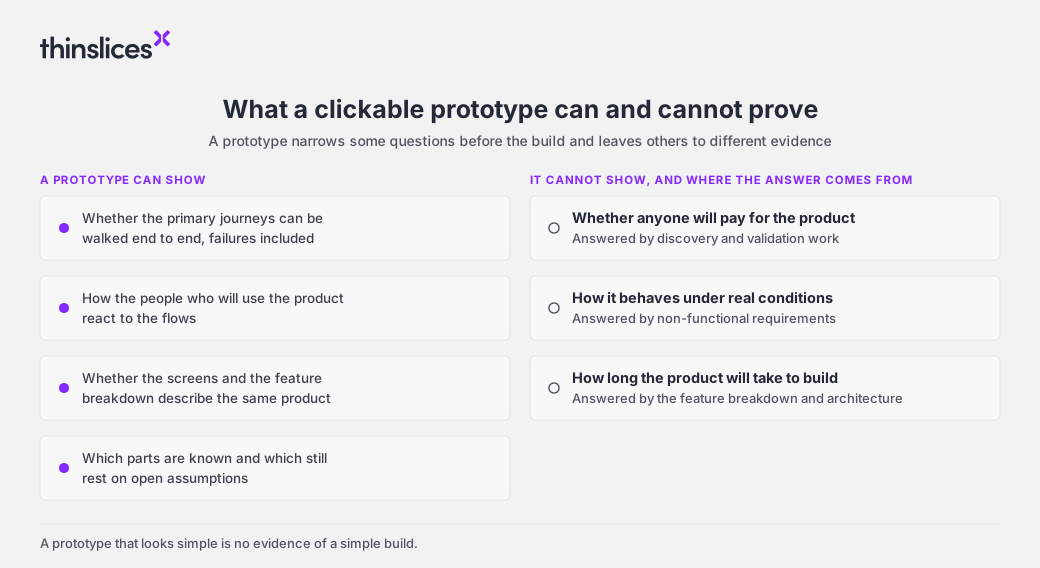
A prototype that passes all four tests is still a narrow instrument, and three questions sit outside its reach.
It cannot show that anyone will pay for the product. Users who complete a flow smoothly have shown that the flow works, which is a different finding from showing that the problem is worth paying to solve. That evidence comes earlier, from the discovery and validation work covered in 7 steps to validate a product idea before you build.
It cannot show how the product behaves under real conditions. Performance at volume, security, data quality and regulatory obligations are invisible in a prototype by design. They belong in the non-functional requirements that sit alongside it, which product design in software development is not UI/UX design covers in more detail.
It cannot show how long the product will take to build. A prototype assembled in an afternoon and one that took three weeks can describe the same amount of build effort, because the estimate comes from the feature breakdown and the technical architecture behind it. A prototype that looks simple is no evidence of a simple build.
How to review a clickable prototype before you sign off
The questions below are for the end of a phase, when the prototype is being presented as the basis for a build decision. They apply to any team or vendor, internal or external.
- What happens when the main journey fails, and can we see it?
- Who outside our leadership team has used the prototype, and what changed because of their feedback?
- Which screens belong to the first release, and where is each one in the feature breakdown?
- Which assumptions are still open, and which screens depend on them?
- What changed between the first version of the prototype and this one?
- Could a development team build from this without guessing what it is meant to do?
The last two deserve a little more weight than the rest. A prototype with no visible history of change has rarely been tested in any meaningful sense, which is why our playbook treats at least one substantive feedback loop with the client as a minimum. And the final question is close to the playbook's own definition of a good prototype: one at sufficient fidelity that the development team understands what it is building without guessing.
Cheap prototypes make the decisions behind them matter more
Prototypes have become one of the cheapest deliverables in product development, and that is mostly good news. Teams can show something interactive in the first week, feedback arrives earlier and fewer ideas survive on description alone. The cost has moved to the parts a screen cannot show: which journeys matter, what the first release contains, which assumptions have been checked and which are still being carried.
None of that guarantees a build will go to plan. Some assumptions stay open at the end of any product design phase, and the honest handling is to record them and price the risk rather than let a confident prototype paper over them. What a budget holder can reasonably ask for is a prototype whose open questions are visible, so that the decision to fund the build is made with them in view.